
The online booking guide
A diary your clients book on their own. A schedule that stays right.
Vet, farrier, equine dentist, osteopath, instructor or photographer: tick a box, and owners book your free slots, just like at the doctor’s. Every appointment goes into your schedule, the client’s and the horse’s yard schedule.
See what it could look like
Les sabots du vallon, a fictional farrier.
These are real Paddoco screens, filled with demo data. This professional, their clients and horses do not exist.
You are a professional
Open your online diary in three steps
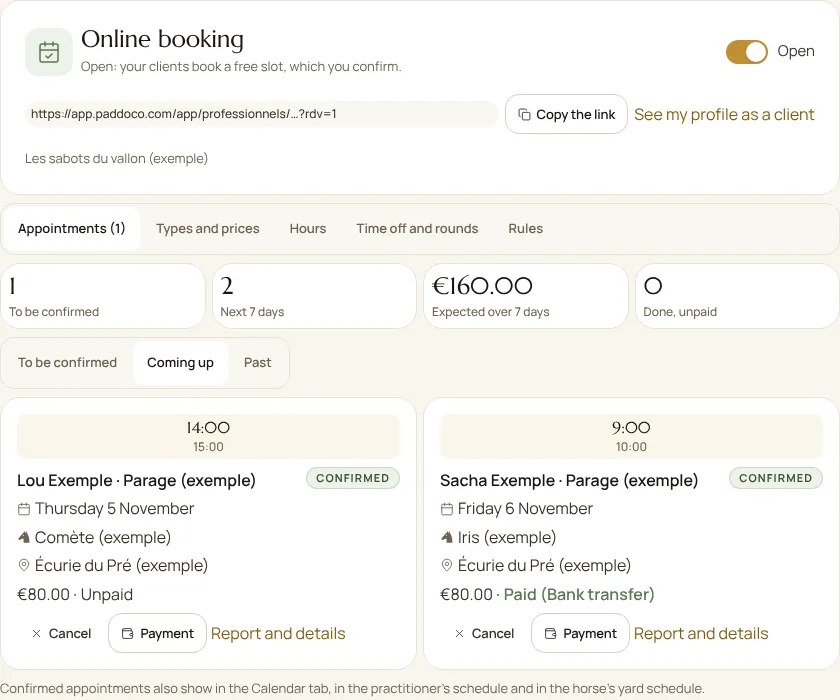
In My business, open the Online booking tab. Your profile must be approved and listed in the directory. A checklist guides you until it opens:
- Describe your appointment types in Types and prices: the service, its name, length and the price shown. The price can be fixed, “from”, on quotation or free of charge, per horse or for the whole appointment. A rate already on your profile can be reused in one tap.
- Set your weekly hours, or a first round.
- Check the rules, then switch on Online booking.
Then copy your booking link and share it: it opens your profile straight on booking. See my profile as a client shows what your clients will see.
An appointment type can be kept for your clients. New owners then send you a request, as before, or become clients.
Hours that fill themselves, with no double booking
In Hours, add your windows for several days at once, for example Monday to Friday from 8:30 to 12:30. Choose the appointment types offered, the place (you travel to the horse, or you receive at your address) and, if needed, a validity period.
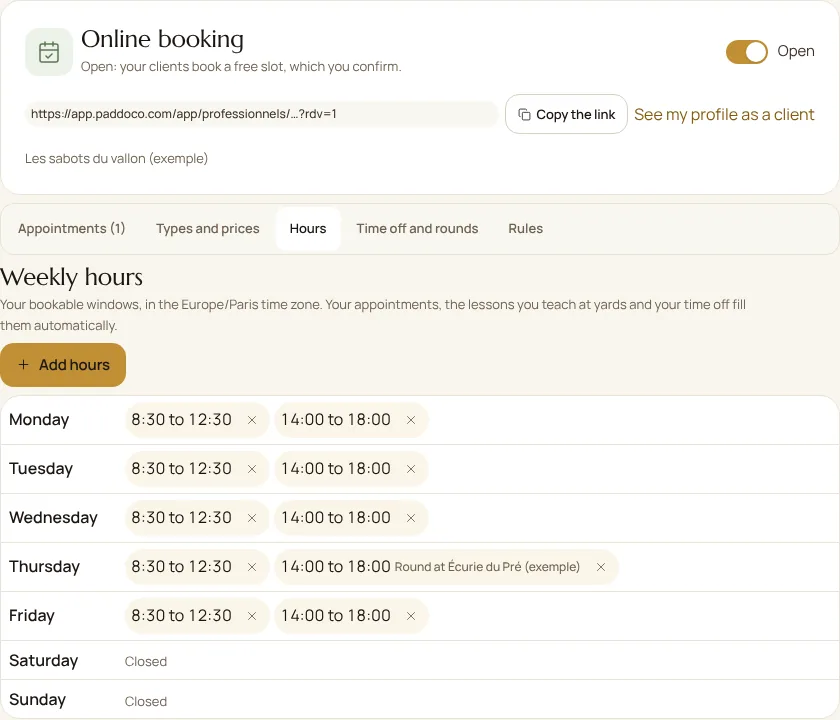
The slots offered take account of everything that already keeps you busy: your appointments across all your businesses, pending bookings, lessons you teach at a yard and your time off. In Rules, set the minimum notice, how far ahead clients can book, the interval between start times and the travel gap between appointments.
Rounds at yards, extra openings and time off
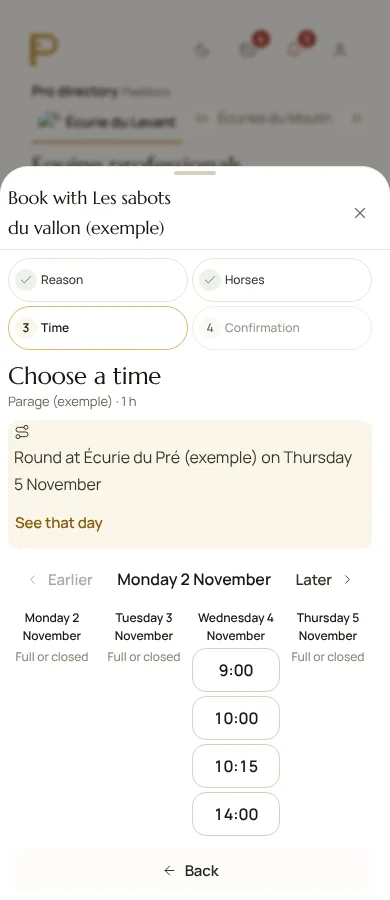
A round groups your appointments at a yard you already serve: only horses kept at that yard can be booked in, and its members see it announced. You cut travel; owners book their place without having to coordinate among themselves.
Open a day adds slots on a specific date. Add time off closes the diary for one practitioner or for the whole team. Appointments already booked stay in place: move them if needed.
Confirm, follow up and record payment
In Rules, choose between two ways of working: you confirm each booking, and the slot stays held for the client until you reply; or confirmation is instant and the appointment goes straight into your schedule.
The Appointments tab gathers bookings to confirm, upcoming and past, with four markers: to confirm, appointments over 7 days, expected amount and done but unpaid. Confirm or decline with a message, cancel while suggesting another day, mark a client as a no-show, then record the payment received and its method.
A confirmed appointment is a real Paddoco appointment: it appears in your diary, in the practitioner’s schedule and in the yard’s, it triggers the reminders before the visit, and your report attaches to it as usual.
As a group: team and secretariat
Each practitioner has their own hours. The business owner and the secretariat open or close the diary, describe appointment types and rules, and confirm for the team. A practitioner manages their own hours and time off. The client can choose “first available” or a specific practitioner.
You are booking
Book in four steps
In the directory, professionals who accept it show the Online booking label. On their profile, choose Book an appointment, or open the link they gave you.
- Choose the appointment type: its length and price are shown.
- Choose your horses. You can book for the horses you own.
- Choose a free time, week by week. Next available takes you to the first open slot.
- Check the place, the indicative total price, the instructions and the cancellation deadline, then authorise the work and confirm.
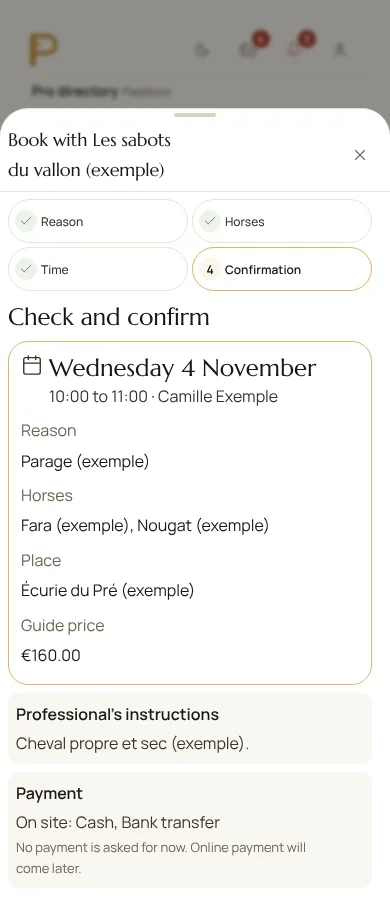
Depending on the professional, the appointment is confirmed straight away, or the slot is held for you until they reply. You are notified either way. Add to my calendar downloads a file to open in your phone’s or computer’s calendar.
Move or cancel
Find your appointments in My requests, Appointments tab. Up to the deadline set by the professional, you can move an appointment to another free time in one gesture, or cancel it with a note. After that deadline, write to them directly.
You run a yard
Professionals’ visits, visible to everyone
The yard’s management books for its school horses; the yard is then shown as the payer. Members see the visits announced at their yard and book their place for their own horses. Confirmed appointments appear in the yard schedule: you know who is coming, when, and for which horses.
Prices shown, payment on site
Appointment type prices are shown before booking, and the total takes the number of horses into account. Today, payment is made on site, by the methods the professional accepts; they then record it in their follow-up.
No payment is requested when booking and no money passes through Paddoco. Online payment and deposits will come later, through a payment provider.
Frequently asked questions
Can two clients book the same slot?
No. The slot is checked at the moment of booking: if someone has just taken it, you are offered another time.
Does the professional see my horse’s whole file?
No. You authorise the work for this appointment. Sharing the care history is optional and can be withdrawn at any time.
I do not own the horse I ride. Can I book?
Online booking needs the owner’s consent. Ask them to book, or send a request to the professional: the owner will approve it.
I also teach lessons at a yard. Could they be booked over by mistake?
No. The lessons you teach at a yard fill your diary: no client can book over them.
Do classic requests disappear?
No. For a special need, a group or a service on quotation, the detailed request is still available, on the profile and within booking.
Does Paddoco take a commission on my appointments?
No. No money passes through Paddoco, so there is no commission on your appointments.
Need a hand?
Tell us your business and the step where you are stuck. We will help you describe your appointment types and hours.
Contact PaddocoOpen Paddoco